
Project
Design Financial Submissions Workflow
Date: May 2017 – Nov 2017
Role: User Experience Designer
Skills: Wireframing, Interactive Design, Visual Design, Prototyping, Peer Programming (CSS)
Tools: Sketch, Axure RP, Keynote
To comply with my confidentiality agreement I have omitted confidential information.
In May of 2017, I was hired as a UX team of one to improve the user experience and UI for the Financial Submissions, which involved all the lines of businesses in JPMorgan submitting their P&L, Balance Sheet and Expenses to corporate finance for analysis. After that, I lead the design of a self-service reporting portal for the organization (see Reporting Project).
Previously, users did all their submissions manually via email and spreadsheets
Automate Financial Submissions
a first for the Financial Analysis organization at JPMorgan
Financial Submissions
UX Work I did for project already underway
For this particular project, the team was in reactive mode and the UX/UI needed to be addressed quickly to meet deadlines. The dashboard was half-way built but had many issues. So, here’s what I did:
- Met with SME’s and stakeholders to understand the requirements
- Created and standardized UI patterns, topography and many UI elements (Sketch Library)
- The design was further improved upon by including whitespace, padding, and consistent use of UI elements.
- Facilitated workshops to iterate design ideas and usability improvements
- Created all wireframes
- Created all final visual designs
- Designed HTML formatted emails
- Facilitated User Acceptance Testing
Typography & UI-patterns
Created libraries and Masters for Sketch and Axure RP


High Fidelity Wireframes using Axure RP

The design included the addition of a progress bar on top. Subsequent user testing proved this to be a very helpful indicator.

The addition of the newly designed Calculations dashboard replaced a manual process. The design included relevant status and downloadable information on the top of the screen that the user previously had to find on other pages, eliminating the need to switch screens. Since there was a lot of results, tabs and expandable columns were used in the design.
Users claimed they would usually stay late to complete this task manually via excel plugins on the particular day of submissions. Now it takes only minutes.
Testing of Designs with Users

Reporting Portal
Project
Design a new self-service reporting portal
Date: Nov 2017 – August 2018
Role: Lead User Experience Designer
Skills: User Research, UX Architect, Workshop Facilitation, Interactive Design, Prototyping, peer programming
Tools: Sketching, Sketch, Axure RP, Keynote
The value proposition
In order to give users more flexibility to manage reports, our team recommended the design of a self-service reporting portal. This was done by adding a web layer onto an existing BI tool that provided pre-determined (canned) reports. We had to work closely with technology to make sure the SDK could provide the APIs needed for the design.
The second phase of this project was to build a separate interface for Interactive Reporting feature that provides real-time custom reports, key data visualizations (identified as most useful during user research), and the capability to manipulate “what if” financial scenarios on the fly.
Make it easy for users to run, customize, & view reports
User Research / Discovery
Technology Exploration
Contextual Inquiries
User Interviews
Understanding the User Scenarios
Strategy & Design
Card sorting
Design Workshops
Work closely with technology
Identify & Design MVP features
Usability Testing
Testing of designs with users
User Research and Discovery
Over a three month period I conducted qualitative and quantitative research that included user interviews, contextual inquiries, and competitive research consisting of technical exploration of financial reporting solutions within JPMorgan. The results of the user research allowed the team to identify key users’ needs and current pain points, as well as key MVP (minimal viable product) features for the “Interactive Reports” initial release. Research further identified some key differences of tasks between the primary and secondary users, mainly concerning the need for data visualization.
Primary, secondary and tertiary Personas

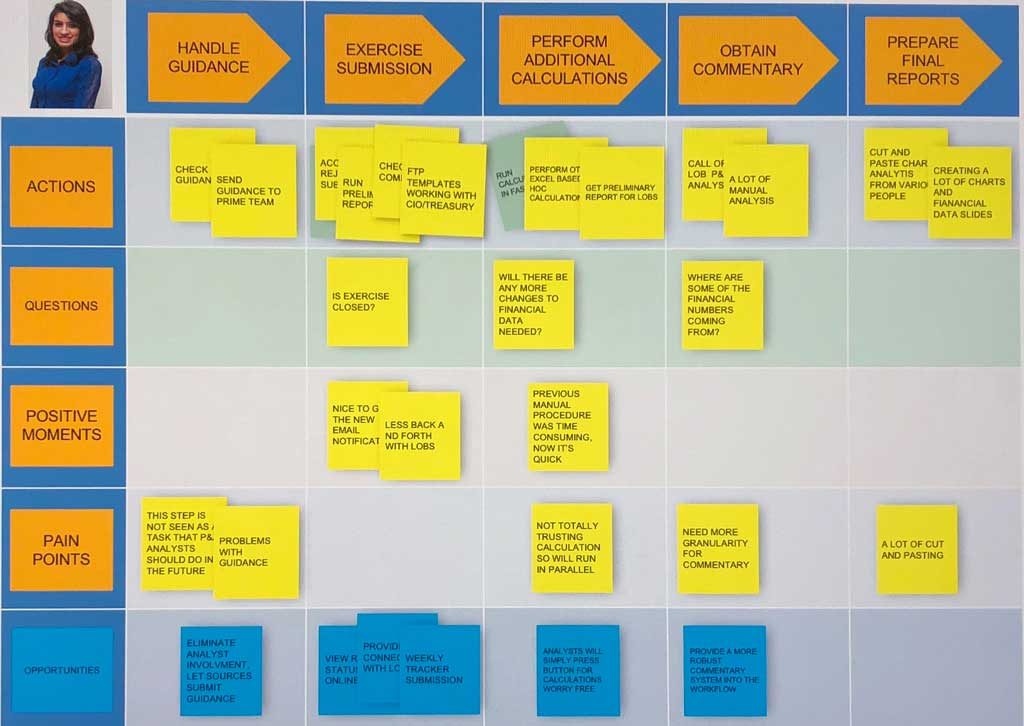
User Journey – A day in the life of the analysts
Workshop facilitation
Ideas
Design
Improve

Technology Exploration


Wireframes & Prototyping


The interactive reporting dashboards design was based on user research and stakeholder interviews and product owner requirements. Research indicated that the user needed to be able to drill down, slice data by line of business (LOB), add financial scenarios (comparing this month to last month, etc..), and view data visualizations on key items identified as important. Off-the-shelf Business Intelligence (BI) tools such as IBM Cognos offer many of these capabilities but with a long learning curve which would require continuous training.
 Previous Project
 Next Project
Previous ProjectNext Project